LightDrop / Transfer files without Wi-Fi
Last updated:
Transfer files without Wi-Fi
"Just AirDrop it" fails the moment the devices are on different platforms, different networks, or no network at all. Here's an honest map of your options — including the one this site exists for.
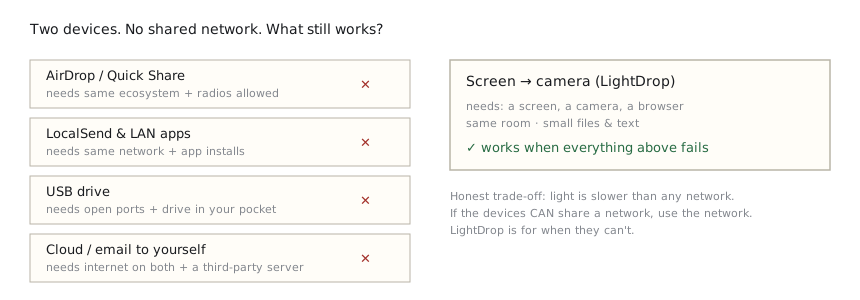
Your real options, compared
| Method | Needs | Speed | Falls down when… |
|---|---|---|---|
| AirDrop / Quick Share | Same ecosystem, radios on | Fast | Crossing iPhone↔Windows, radios disabled by policy |
| LocalSend & similar | Same local network, app installed | Fast | Guest/corporate networks isolate clients; no installs allowed |
| USB drive / cable | Ports and permission to use them | Fast | USB blocked on managed machines; no adapter in your bag |
| Cloud (email it to yourself) | Internet on both, an account | Medium | No connectivity; content shouldn't touch a third-party server |
| Screen → camera (LightDrop) | A screen, a camera, a browser | Slow, small files | Large files; devices not in the same room |
When light is the right answer
- A corporate laptop that allows browsing but blocks USB and file-sharing apps, and you need a config or ticket on your phone.
- Two phones on cellular plans, no hotspot allowed, one small file to pass.
- A machine on an isolated network where a document must come out — visibly, auditable, no radio.
- Anywhere the honest requirement is "no new software, no shared network, right now".
How to do it
Open Send on the device with the file, Receive on the other, and point the camera at the code stream. Everything is processed locally in the browser and verified with SHA-256 on arrival. After a first online visit, both pages also work fully offline.
Rule of thumb: if the devices can share a network, use the network — it's faster. LightDrop is for when they can't.
Three scenarios, in detail
The locked-down work laptop
Corporate machines commonly allow web browsing but block USB storage, file-sharing apps, and personal cloud logins. A config file, an export, or a long ticket number needs to reach your phone. The browser is the one door that's open — and a screen-to-camera transfer uses nothing else. Nothing is installed, nothing plugs in, and the transfer itself never touches the corporate network.
Two phones, two carriers, zero bars of trust
Visiting a colleague abroad, both on cellular, hotspot disabled by plan or policy. AirDrop fails across ecosystems; LocalSend has no common network to use. Point one screen at the other camera and a file or note crosses in seconds — the same way you'd show someone a photo, except the receiving side keeps a verified copy.
No network at all
Field work, flights, basements, or places where radios must stay off. After one prior visit, LightDrop's pages work fully offline on both devices, so the transfer needs no connectivity anywhere in the loop — the light between the two screens is the entire transport.
A note on security
No shared network also means no network to eavesdrop. But the stream is visible light: anyone who can film the sending screen can read it. Use it for the things you'd hand over on paper — links, configs, documents — and keep passwords and private keys off screens entirely. The security page draws this boundary precisely.
Frequently asked questions
Isn't Bluetooth file transfer an option?
Sometimes — when both devices support it, radios are enabled, pairing succeeds, and the platforms cooperate. In practice, cross-platform Bluetooth file transfer is unreliable and often disabled on managed devices. A screen and a camera need no pairing handshake at all.
Can't I just create a hotspot?
If your plan and your device policy allow it, a hotspot plus a LAN tool like LocalSend is faster for big files. Screen-to-camera wins when hotspots are blocked, when you don't want the devices to ever share a network, or when you just need one small thing across right now.
How large a file can realistically cross this way?
Text and documents move in seconds; a 1 MB file takes under a minute at close range; 10 MB is a few minutes and the sensible ceiling. The hard cap is 64 MB, but by then a network really is the better tool — this method's value is working when networks can't.