LightDrop / How it works
Last updated:
How it works
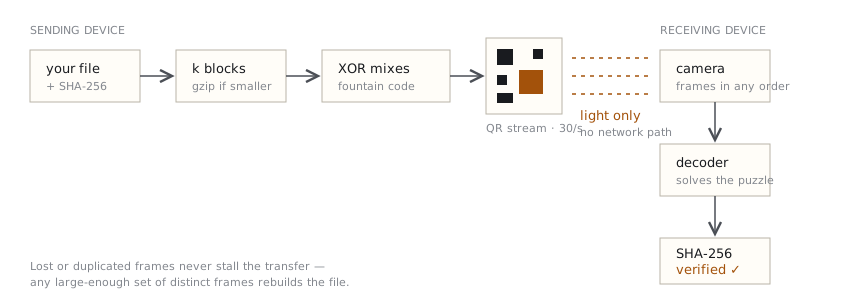
LightDrop moves data the way a lighthouse moves information: by blinking. Here is the whole pipeline, from the file you pick to the verified copy on the other side.
1. Everything starts — and stays — in your browser
When you choose a file or paste text, the page reads it into memory using standard browser APIs. There is no upload step anywhere in the pipeline. The server's only job was to deliver this website's static files; after your first visit, even that is cached and the app works offline.
2. Compression, only when it helps
The sender first tries gzip compression on your content. If the compressed form is genuinely smaller — typical for text, JSON and logs — it is used. If not (JPEGs and ZIPs are already compressed), the original bytes go out untouched. You'll see which decision was made on the send screen.
3. Fountain coding: why lost frames don't matter
A naive approach would show piece 1, piece 2, piece 3… and stall the moment your camera blinks. LightDrop instead uses a Luby Transform fountain code. The payload is cut into k equal blocks, and every displayed frame is the XOR of a pseudo-random subset of them. The random choice is derived from a seed printed in the frame's header, so the receiver can reconstruct exactly which blocks each frame mixes.
The consequence is lovely: the receiver just collects any sufficiently large set of distinct frames — missed frames, duplicates and out-of-order capture are all fine — and solves the puzzle by progressive elimination, like a Sudoku that fills itself in. No back-channel, no "resend frame 42", no pairing.
4. Frames become QR codes
Each frame — a 22-byte header plus one coded block — is drawn as a QR code on a canvas, at a default of 30 codes per second and about 1.4 KB per code. QR error correction is kept at its lightest level on purpose: a damaged frame is simply dropped, and the fountain code shrugs it off.
5. The receiver watches and solves
The receiving page captures camera frames and hands them to a decoder running in a background Web Worker, keeping the interface smooth. Each recognized QR yields one coded frame; the decoder reduces it against what it already knows, and progress ticks forward. The session ID in every header means the receiver can join mid-stream, and instantly notices if you restart the sender with new content.
6. Verified, or nothing
Before sending, the sender computes the SHA-256 hash of your original content and embeds it in the stream's metadata. After reassembly (and decompression, if used), the receiver computes the hash of what it rebuilt. Only if the two match does it declare success and offer the download. A transfer that can't prove integrity fails loudly instead of handing you a silently corrupted file.
What this design trades away
Light is a narrow pipe. Tens of kilobytes per second is honest throughput for a screen-and-camera link, which is why LightDrop positions itself for text, configs and small files — not photo libraries. If both devices can share a network, tools like LocalSend will be far faster. The point of LightDrop is working when they can't.