LightDrop / Offline text transfer
Last updated:
Offline text transfer
The most common cross-device transfer isn't a file — it's a paragraph. A long URL, an SSH public key, a JSON config, a 2FA backup list you're moving the honest way. Retyping is error-prone; emailing it to yourself needs a network and leaves a copy on a server. There's a third way.
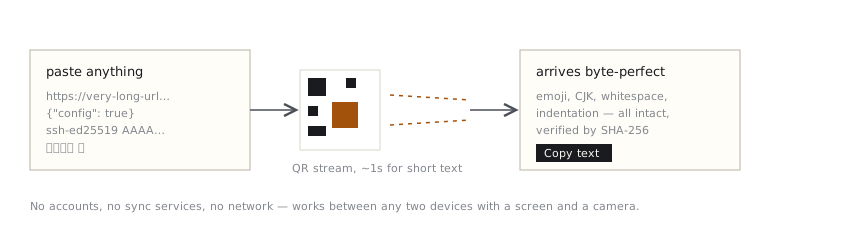
Paste, point, done
- Open Send, switch to Text, and paste anything up to megabytes long.
- Open Receive on the other device and aim its camera at the code.
- Short text lands in about a second. The received text appears with a one-tap Copy button — byte-for-byte identical, emoji, CJK characters, whitespace and all, verified by hash.
Built for the fiddly stuff
- Links — session-restore URLs, calendar invites, that 400-character tracking link.
- Code & JSON — indentation and unicode survive exactly; the transfer is binary-faithful, not "looks about right".
- Markdown notes — meeting notes from a work machine to your phone without touching email.
- Anything you'd otherwise retype — Wi-Fi guest passwords for visitors, serial numbers, addresses.
Why not just use the clipboard sync my platform has?
Universal Clipboard and similar features are great — inside one vendor's ecosystem, with the same account signed in on both sides, with sync enabled and working. Offline text transfer through light needs none of that: it works iPhone↔Windows, work-laptop↔personal-phone, or between two devices that have never met. And after your first visit, the tool itself works with no connection at all.
One honest caveat: the code stream is visible on screen, so don't use it for passwords to your actual accounts — anything that can film the screen can read the stream. Details on the security page.
Byte-perfect, not “looks about right”
Retyping mangles things silently: an em-dash becomes a hyphen, a tab becomes spaces, an O becomes a 0, and a public key stops working. LightDrop transfers the exact bytes of what you pasted and proves it — the receiver computes a SHA-256 hash of the reconstructed text and only shows the Copy button when it matches the sender's hash exactly. Emoji, CJK characters, trailing whitespace, and indentation all survive because nothing is ever retyped or re-encoded.
Against the alternatives
| Method | Needs | Leaves a copy where? |
|---|---|---|
| Email it to yourself | Internet + account on both | Mail servers, indefinitely |
| Cloud clipboard sync | Same vendor ecosystem, signed in, sync on | Vendor's cloud |
| Messaging yourself | Internet + the app on both | Chat history + provider |
| Retyping | Patience | Nowhere, but errors creep in |
| Screen → camera | A screen and a camera | Nowhere — light isn't stored |
Frequently asked questions
Is formatting like Markdown or code indentation preserved?
Yes, exactly. The transfer is byte-level: tabs, spaces, line endings, and Unicode all arrive as sent, verified by hash. What you paste is what the other device copies.
How much text can I send?
Practically unlimited for text — even a megabyte-long log is only a short wait. Short items like URLs and keys transfer in about a second because they fit in very few frames.
Should I send passwords this way?
No. The QR stream is visible on screen, so anyone able to film the screen could capture it. Treat it like saying something aloud in the room: fine for links, notes, configs, and public keys — wrong for passwords, private keys, and recovery phrases.