LightDrop / Air-gap file transfer
Last updated:
Air-gap file transfer
An air-gapped machine has no network by design — which makes every legitimate file movement a ceremony of approved USB drives. An optical link is a different kind of channel: strictly one-way, visible to the naked eye, and requiring no media to be plugged in.
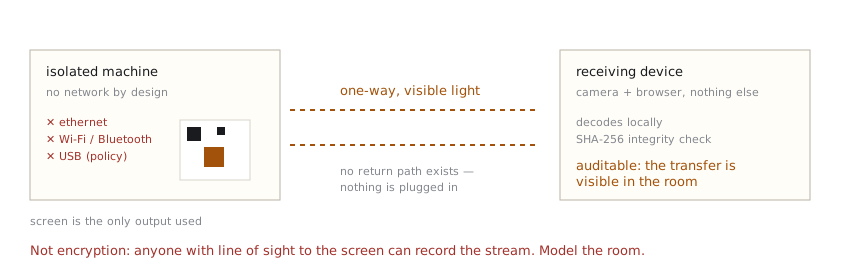
What an optical channel actually is
LightDrop turns data into a stream of QR codes on the sender's screen; a camera on the receiving side reads them. As a channel, this has three properties security people care about:
- Physically unidirectional. Light flows from screen to camera. The receiving device sends nothing back — there is no return path to attack, similar in spirit to a data diode.
- No media insertion. Nothing is plugged into the isolated machine, sidestepping the classic USB-borne malware vector for outbound transfers.
- Observable. The transfer is visible in the room. That's auditable — and it also means anyone watching can record it. This is a feature and a limitation at once.
Threat model — read before relying on it
- This tool does not encrypt the stream. A camera with line of sight captures everything. Assume the room is part of your threat model.
- It protects the channel, not the endpoints. A compromised sender can encode exfiltration alongside your document; a compromised receiver can misuse what it decodes. Optical transfer is not an endpoint control.
- Integrity is verified (SHA-256 match required before the file is released), but integrity is not authenticity — the hash proves the bytes crossed intact, not who authored them.
- Organizational policy beats tooling. If your environment prohibits unapproved data movement, an optical channel is still data movement.
Deployment notes
- LightDrop is a static web app. For isolated environments, self-host the built files on an internal HTTPS server — no external dependencies are fetched at runtime, and camera access requires a secure context.
- After one visit, the app is cached and runs without any connectivity.
- Practical ceiling is small: configs, logs, signed artifacts, reports — designed for small files and text, suggested ≤10 MB.
For the mechanics of the fountain coding and verification, see how it works; for the plain-language boundary of what this does and doesn't protect, see security.
Operational checklist
Before:
- Self-host the static build on an internal HTTPS server, or pre-cache the PWA on both devices while they're still on a permitted network — after one visit it runs with no connectivity.
- Confirm the movement is authorized. An optical channel is still data egress under any sane policy.
- Check the room: who and what can see the sending screen? CCTV counts.
During:
- Note the SHA-256 shown on the sender. After transfer, the receiver's verified hash should match it — that pair of values is your audit record.
- Keep transfers small and purposeful: configs, logs, signed artifacts, reports.
After:
- Use Clear on the receiver once the file is saved where it belongs — the payload lives only in page memory until then.
- Log the transfer (what, when, hashes) if your environment requires movement records.
When not to use this
- Ingress to the isolated machine. This tool moves data out through the screen. Bringing data in means pointing a camera-equipped isolated machine at an external screen — a different risk conversation entirely, and usually the wrong one.
- Secrets. The stream is unencrypted visible light. Keys, credentials, and recovery material stay off screens.
- Anything your policy prohibits. A clever channel is not an authorization.
Frequently asked questions
Does either device need internet during the transfer?
No. The transfer itself is only light between the screen and the camera. After a first visit (or when self-hosted internally), the pages themselves also load with zero connectivity — airplane mode on both sides works.
How is this different from a data diode?
It shares the key property — physically one-way flow with no return path — but a data diode is certified network hardware for continuous feeds, while this is a browser tool for occasional small transfers. Complementary tools; different jobs and assurance levels.
Can the transfer be audited?
More easily than most: it's visible in the room while it happens, and both ends display the same SHA-256 for the content, which can be recorded as evidence that exactly those bytes moved.